
monday.com Has an AI That Calls Your Customers & We Tried It
Monday.com has an AI agent now, and she calls people. Like, real phone calls. We tested her out and honestly? Pretty impressive.
Meet Claire
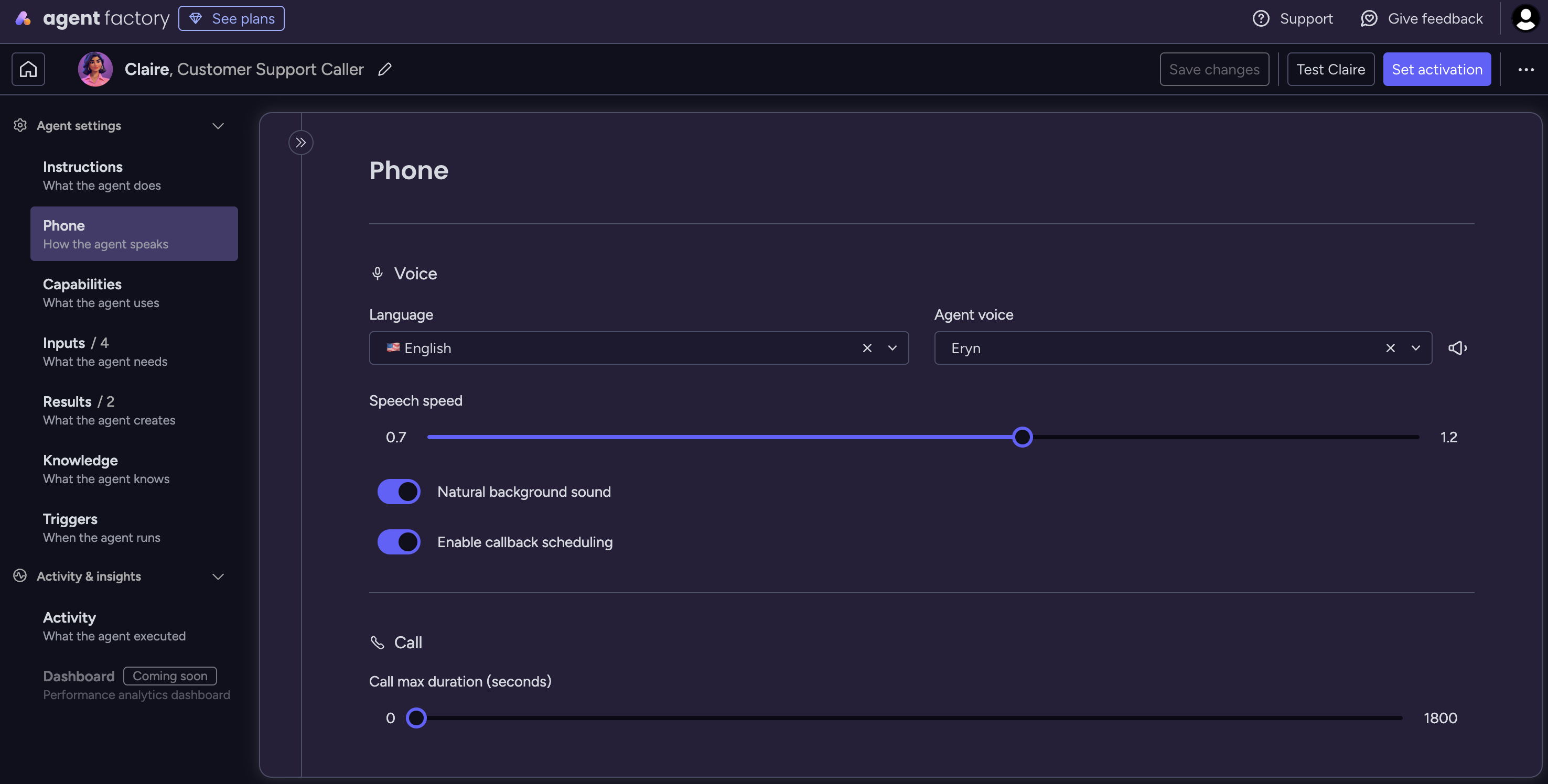
Claire is a monday.com Customer Support agent, and setting her up is easier than you'd expect. You can tweak her voice and how fast she talks - and interestingly, you can also select a language.
The list is surprisingly broad: Spanish, German, Portuguese, Hindi, Japanese, Malay, and more. I was only able to test the English version, so I can't speak to how natural the others sound, but the range alone suggests they're thinking beyond English-first markets. Once you're happy with how she sounds, feed her your knowledge base articles so she actually knows what she's talking about, and then... let her loose.
She Called My Portuguese Number. No Drama.
You can give Claire a pre-selected phone number (US, Canada, or Israel) or bring your own. I was a little curious how she'd handle calling a Portuguese number - turns out, zero issues. The call went through, she did her thing, and I got both a transcript and a recording afterwards.
The transcript was spot-on except for one funny hiccup: it heard "monday.com" as "monitor.com." Probably my accent. We'll call it a feature.

When Does She Actually Run?
You've got a few ways to trigger Claire:
- On a recurring schedule
- As a one-time task
- Embedded on your website so visitors can interact with her
- Via HTTP POST requests if you want to plug her into your own systems
That last one is where it gets interesting for anyone building more complex workflows - you can kick her off programmatically as part of a bigger automation.

What Can She Do, Exactly?
Calls are just the start. Hook up your email and she can write and send emails too. The integrations go pretty far, though:
📅 Google Calendar - check and create events📁 Google Drive - list, update files💬 Slack - send messages📋 monday.com - read and update boards and items
You pick which ones she gets access to, so you stay in control.
Who Is This Actually For?
Claire is just one of several pre-built agents monday.com offers. Depending on your team, one of these might fit you better:
- Customer Support (Claire) - handles inbound questions, follows up with customers, pulls answers from your knowledge base
- SDR Expert - outreach, follow-ups, keeping your pipeline moving without a human chasing every lead
- Appointment Coordinator - books and manages meetings, syncs with your calendar, so nobody falls through the cracks
- RSVP Agent - great for events, confirmations, and keeping track of who's coming
Basically, if your team has a repetitive, communication-heavy workflow - there's probably an agent for it.
How Much Does It Cost?
There's a free tier to get started, and it's genuinely usable for small-scale testing:

Squad also includes 1 inbound phone number, and Force bumps that to 3, plus unlocks multi-agent workflows - meaning your agents can actually hand off tasks to each other.
The Good and The Not-So-Good
Let's be real about this.
The good:
- Genuinely saves time on repetitive, high-volume communication tasks - the kind of stuff that burns out human teams fast
- Setup is approachable - you don't need a developer to get an agent running
- Integrations are solid - Calendar, Drive, Slack, monday boards... it covers most of the stack teams already use
- Free tier is real - 10 calls a month is enough to actually evaluate whether it fits your workflow before spending anything
- International calling works - tested from Portugal, no issues!
The not-so-good:
- It's only as good as your knowledge base - if your docs are patchy or outdated, Claire will be too. Garbage in, garbage out.
- Credits can go fast - at scale, you'll want to map out your usage before committing to a plan
- AI calls aren't for everyone - some customers genuinely don't like talking to an AI, and there's no way around that. Transparency about it matters.
- Limited phone number options - US, Canada, and Israel out of the box. If your business is primarily elsewhere, you'll need to bring your own number.
- Multi-agent workflows are Force-only - the really powerful stuff is locked behind the top tier
Bottom Line
If you're already using monday.com, the agents are a natural next step - especially if your team is drowning in repetitive calls, follow-ups, or scheduling. The free plan lowers the barrier to try it, and the integrations mean it can actually slot into how you already work.
Just go in with realistic expectations: these agents amplify a good process. They won't fix a broken one.
Related Questions
The agents are part of monday.com's platform, so yes - you'll need a monday.com account. That said, the free agent tier means you can explore them without extra cost beyond your existing plan.
That's up to you, but being upfront about it is strongly recommended. Some people are completely fine with AI calls, others really aren't. A quick "you'll be hearing from our AI assistant" heads-up goes a long way.
Credits are consumed whenever an agent takes an action - making a call, sending an email, updating a board item, and so on. More complex workflows burn through credits faster, so it's worth thinking through your expected volume before picking a plan.
The pre-built agents (Claire, the SDR Expert, the Appointment Coordinator, etc.) cover the most common use cases, but they're configurable - you set the knowledge base, the integrations, the triggers, and the voice. You can create your own agent too!
If the answer isn't in the knowledge base you've set up, the agent won't just make something up - but it also won't magically escalate to a human unless you've built that into your workflow. Setting up a clear handoff process for edge cases is worth doing before you go live.
In our test, yes - the voice sounded natural (although you can still tell this is AI), the call connected internationally without issues, and the transcript was accurate (one accent-related hiccup aside). Whether it meets your bar depends on your use case, which is exactly why the free tier with 10 calls/month exists.
Library
Knowledge to build better workflows
A curated collection of insights, guides, and case studies on workflow design, monday.com implementation, and operational structure.
%20(600%20x%20400%20px)%20(1).png)
%20(600%20x%20400%20px).png)
When monday.com Isn't Missing Much - Just One View
How we solved a construction company's scheduling headache with one embedded app instead of a whole new platform.

monday CRM vs Salesforce vs HubSpot: An Honest CRM Comparison for Growing Businesses
An honest, experience-driven comparison of monday CRM vs Salesforce, HubSpot, and other leading CRMs—helping businesses choose the right platform based on their size, workflows, and growth stage. Discover where monday excels in flexibility, usability, and speed, and when competitors may be a better fit. Ideal for teams looking to balance power, simplicity, and scalability in their CRM choice.

When to Hire a monday.com Expert: Making the Most of Your Work OS
A well-configured monday.com setup can transform how your team works—but getting it right isn’t always straightforward. This article explores the key signs you need a monday.com expert and how the right implementation can turn your Work OS into a powerful, automated business engine. Learn when to bring in expert help and how it can save time, improve adoption, and maximize your ROI.

The True Cost of monday.com: Pricing Tiers, Hidden Expenses, and Real ROI
Understanding the true cost of monday.com goes beyond subscription pricing—it includes seats, integrations, apps, and implementation time. By evaluating the full picture and planning strategically, businesses can avoid hidden expenses and unlock strong ROI. The key is aligning the platform with your long-term growth and operational needs.